
In part 1 of this blog series, we talked about the two biggest contact center scheduling challenges revealed by the 2025 2025 Call Centre Helper survey What Contact Centres are Doing Right Now and whether existing WFM technology is mature enough to solve these problems.
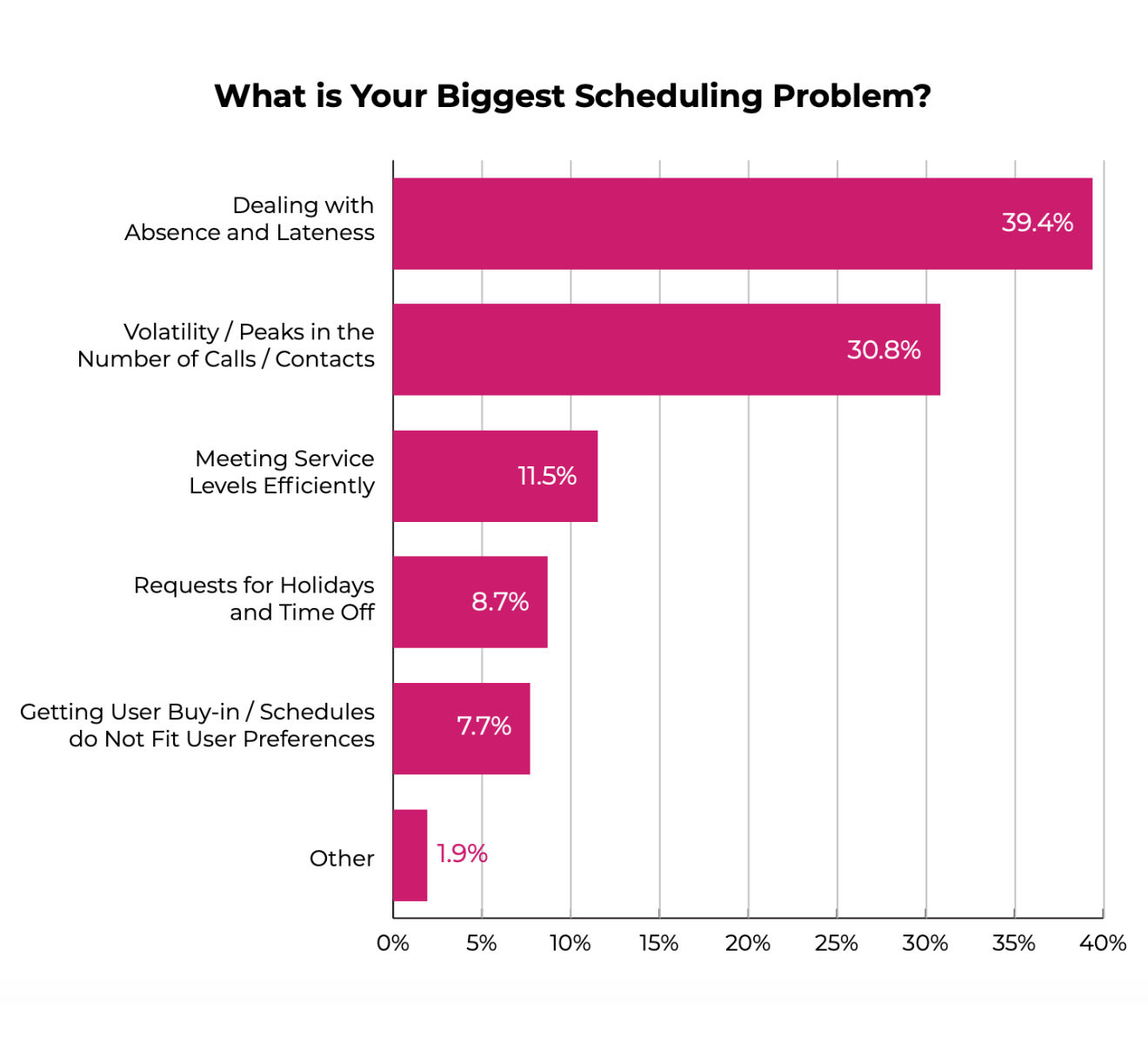
In this blog, we explore the remaining three major challenges and see:
- What they mean
- How they impact contact centers
- How well WFM software shapes up to them
Problem 3: Meeting Service Levels Efficiently
Service Level (SL) is the percentage of contacts that are responded to within a target time. According to Call Centre Helper, Service Level is typically the number one metric in contact centers.
Meeting service level efficiently is about achieving your SL goal (e.g., 80% of calls answered within 20 seconds) with the optimum level of resources. The objective is to have the right number of agents in their seats to handle the volume of contacts in each time interval - never too many and never too few.
Impact on customers
When insufficient agents are scheduled, customers have to wait longer to be served. When they are finally served, the agent will likely have jumped from one interaction to the next without a pause and will be aware that there is a long queue of customers also waiting to be served. Consequently, the agent may try to complete the interaction as quickly as possible, failing to take care to understand the customer’s issue and find the best solution. Chronic failure to meet SL goals has a dramatic negative effect on customer experience.
Impact on employees
SL goals are not met when insufficient agents are in place to handle the volume of customer enquiries. Agents face excessive contact volumes, pressure to clear the backlog, and no time to catch their breath between customer interactions.
When service goals aren’t met, agents can feel failure and guilt. They may feel they are letting the team down or failing their customers.
Agents bear the brunt of poor customer experience. They have to deal with angry customers, more escalations, and more difficult calls.
To make matters worse, when the service level goal comes under threat, classic intraday management techniques include cancelling or postponing non-customer activities like training, coaching, and 1:1s.
This all adds up to increased stress, low job satisfaction, and a desire to quit the job.
Impact on business
Consistently failing to meet SL goals can severely damage your organisation’s reputation. Poor service is one of the most common reasons for poor online customer reviews. This can lead to customer churn where alternative suppliers are available. It can also lead to increased staff turnover, which is costly and disruptive. This recent report from Insignia Resources shows the business impact of staff turnover in today’s contact center. Even if agents don’t leave because of burnout, they may use techniques like call avoidance to reduce their stress levels.
If you are hitting your service level goals but not doing it efficiently, you are incurring unnecessary labor costs and damaging the bottom line. That’s because inefficient schedules typically include periods of over-staffing as well as under-staffing.
What are the most important call center KPIs?
For many call centers, SL of 80/20 is the #1 metric to measure performance - but what actually drives outcome?

How WFM software can help
Meeting service levels efficiently is the core purpose of workforce management. WFM helps in three ways:
- Accurate forecasting
Forecasting calculates the number of agents you will need in each time interval so you can schedule your employees accordingly. Without an accurate forecast, you will inevitably be understaffed or overstaffed most of the time. Fortunately, the best WFM software uses powerful algorithms, including AI/machine learning, to create super-accurate forecasts with almost no effort. - Optimized scheduling
The 2025 Call Centre Helper survey revealed that today’s contact centers are using a diverse set of scheduling styles, including:
- Full-Time Shifts
- Part-Time Shifts
- Rotational Shifts
- Split-Shifts
- Banked Hours
- Stepped / Staircase Shifts
When it comes to meeting service levels efficiently, most of the WFM magic is in optimized scheduling. The best WFM software uses powerful algorithms to search countless shift permutations to find schedules that closely match the supply of agents with customer demand at all times. The algorithms use all the scheduling styles available in your operation, and find optimum start times, finish times, and break times for all employees. What’s more, the schedules will be compliant with agents’ employment contracts and labor laws.
3. Effective intraday management
Even if you invest enormous effort in building accurate forecasts and efficient schedules, one thing is for sure: It won’t go 100% according to plan when the day arrives. For example, you could experience:
- Agents calling in sick
- Technical issues
- Product issues
- Unplanned marketing events
- Weather events
WFM systems help you to react on an informed basis, e.g., by re-scheduling one or more agents, thus defending SL performance in the face of headwinds.
Problem 4: Requests for Holidays and Time Off
Employee ‘time off’ falls into several categories:
- Vacation/holidays, sometimes called Paid Time Off (PTO)
- Unpaid Leave
- Sick Leave
- Parental Leave
- Bereavement Leave
- Civic Responsibilities, e.g., Jury Duty
The focus of this problem is managing vacation/holidays. Unlike most of the other types of time off, vacations are nearly always subject to approval. The decision about granting or declining a request should be made carefully, because it has multiple consequences.
Impact on customers
When an agent takes time off, the staffing level reduces by 1 for each interval of the time-off period. Coverage (provided staffing minus required staffing) thus also reduces by one. If coverage becomes seriously negative, that is bad news all round.
The primary requirement from customers is that when they have a query, a company representative is available. If insufficient agents are available, the same customer impacts listed for problems 1, 2, and 3 in this document apply.
Impact on employees
Most contact center agents are more excited about what they do outside the workplace than what they do inside it. For that reason, time off is an emotive subject. Having time-off requests declined can be demotivating and damage the employee experience.
It’s also important that the time-off process is perceived as ‘fair’. Any suspicion that colleagues are getting preferential treatment for their time-off requests will damage team cohesion.
The speed of response to time-off requests is also important to employees. The need for time off can arise outside working hours, and agents really value getting a yes/no decision instantly, 24/7.
Impact on business
Being too generous when granting time off can result in understaffing. That is damaging for the customer, the employee, and the business. Customer churn and elevated staff turnover are the main business consequences of chronic understaffing.
Being too miserly with time off can lead to resentment and thus reduce employee engagement. It can also lead to undesirable behavior, such as sick leave being used as a substitute for declined time-off requests.
Having valuable staff spend a lot of time manually deciding whether to grant time off is bad for the bottom line, too. It’s wasteful to have skilled employees spending time on number crunching that they could be spending on improving performance, coaching their teams, or delighting customers.
How WFM software can help
Every time-off decision should be made by examining its impact on staff coverage. Most WFM systems include a view or a report that reveals expected coverage levels.
Good WFM systems provide the means for planners and team leaders to make time-off decisions on an informed basis. They clearly show the impact on coverage of granting time off and may even make recommendations about which requests should be granted and which should be declined.
The best WFM systems enable users to pre-define rules that govern time-off decisions, e.g., the maximum level of understaffing that will be tolerated, or a quota for time off which can be varied by time; for example, the quota may be reduced during peak seasons. With these rule-based systems, agents typically make their request on a self-service basis, e.g., in a web portal or smartphone app. The system instantly makes a decision and informs the agent if the request was successful.
Many organizations keep time-off records in their Human Resources (HR) system. Many of these systems include a self-service time-off request feature for employees. If you have a WFM system that’s capable of making time-off requests that minimize the impact on customers, employees, and the business, it is a mistake to use the HR time-off feature. This topic is explored in this blog post: Time-off management: Why WFM software beats HR software.
Problem 5: Getting User Buy-in / Schedules Do Not Fit User Preferences
Problem 3: Meeting Service Levels Efficiently (above) explores some of the innovative scheduling methods that enable organizations to create efficient schedules. But if the agents are reluctant to work the shifts that are assigned to them, those fancy schedules are effectively worthless. The challenge is to get agents to buy into the schedules so that the benefits of optimized scheduling can be realized.
Impact on customers
When agents don’t buy into their schedules, their schedule adherence and attendance record are likely to suffer. When that happens, there will be periods of understaffing. That results in more waiting time for customers and weaker service levels. What’s more, agents who are dissatisfied with their working conditions are less likely to go the extra mile and deliver a great experience for customers. To quote Richard Branson, “If you look after your staff well, they will look after your customers. Simple.”
Impact on employees
When schedules don’t match employees’ preferences, their work/life balance is damaged. They may find difficulty participating in personal activities or family commitments. Employees become frustrated, resentful, and feel a sense of unfairness. Ultimately, they are likely to ‘vote with their feet’ and move to an employer that can offer more palatable schedules.
Impact on business
Failure to win buy-in from employees to their schedules will quickly impact customer experience. That translates into decreased customer satisfaction and increased customer churn. Left unchecked, a lack of buy-in is likely to lead to excessive staff turnover.
How WFM software can help
WFM software should go beyond simply matching customer demand with the supply of agents. As well as ensuring that optimized schedules are compliant with employment contracts and labor law, the best WFM systems enable you to capture agents’ working time preferences and availability.
They also let you ‘give something back’ to agents in return for their acceptance of the new schedules. The best WFM systems let you introduce self-service features that empower agents to:
- Bid for shifts
- Swap shifts with colleagues
- Book time off
It’s not just about software. It’s good practice to invest effort in discovering what shifts work best for each employee. A shift that would be demotivating for one employee might be perfect for another. Regular shift reviews are a great idea.
Key takeaways
The evidence is clear: the best WFM software does indeed rise to the scheduling challenges of 2025. To recap, the top 5 contact center scheduling problems in 2025 are:
- Dealing with absence and lateness
- WFM helps by respecting working time preferences when scheduling, enabling self-service shift swaps, calendar integration helping agents to be punctual, adherence monitoring, and absence reporting
- Volatility / peaks in the number of calls / contacts
- WFM helps by more accurately forecasting peaks and valleys, optimized scheduling to cover highly variable demand, and intraday management that helps take proper corrective action when spikes occur
- Meeting service levels efficiently
- WFM helps by more accurately forecasting staffing needs, optimized scheduling that enables efficient scheduling styles such as variable start/stop times and schedule lengths, and effective intraday management to defend service level on the day
- Requests for holidays and time off
- WFM helps by revealing the impact of granting time off, making time-off recommendations, automated approval 24/7 based on pre-defined rules, and agent engagement via smartphone
- Getting user buy-in / schedules do not fit user preferences
- WFM helps by enabling you to build in agent preferences and availability at the scheduling stage, empowering agents to bid for shifts, swap shifts with colleagues, and book time off, all on a self-service basis via the smartphone
If your current WFM software doesn’t handle these problems well, it’s time to challenge your vendor or consider an upgrade. If you’re in the process of selecting new WFM software, it’s a good idea to check how well each system meets these requirements.
Get the checklist of WFM software must-haves to tackle the biggest scheduling challenges of your contact center.