Product updates

Curious about what's new in Peopleware? You've come to the right place.

2026

May 28, 2026

Reworked Balances and Time Accounts

Live

This update is for customers using the new Time Off.

The reworked Balances and Time Accounts are now available in the new Time Off — bringing clearer balance calculations, more granular permissions, and (shortly) public API access for balance data. Find details in our Help Center.

May 28, 2026

Shift Center Desktop — a faster, installable version for Windows

Live

Shift Center is launching as an installable Windows desktop application, delivering significantly faster performance when working with large schedules, long date ranges, or many activities. We are rolling it out to customers in stages. If you would like to use it sooner, get in touch with your CX/CSM contact.

May 21, 2026

Coming next week: Reworked Balances and Time Accounts

Starting next week, a comprehensive update to Balances and Time Accounts is coming to the new Time Off — bringing clearer balance calculations, a more fine-grained permission model, and public API access to balance data.

This update is for customers using the new Time Off.

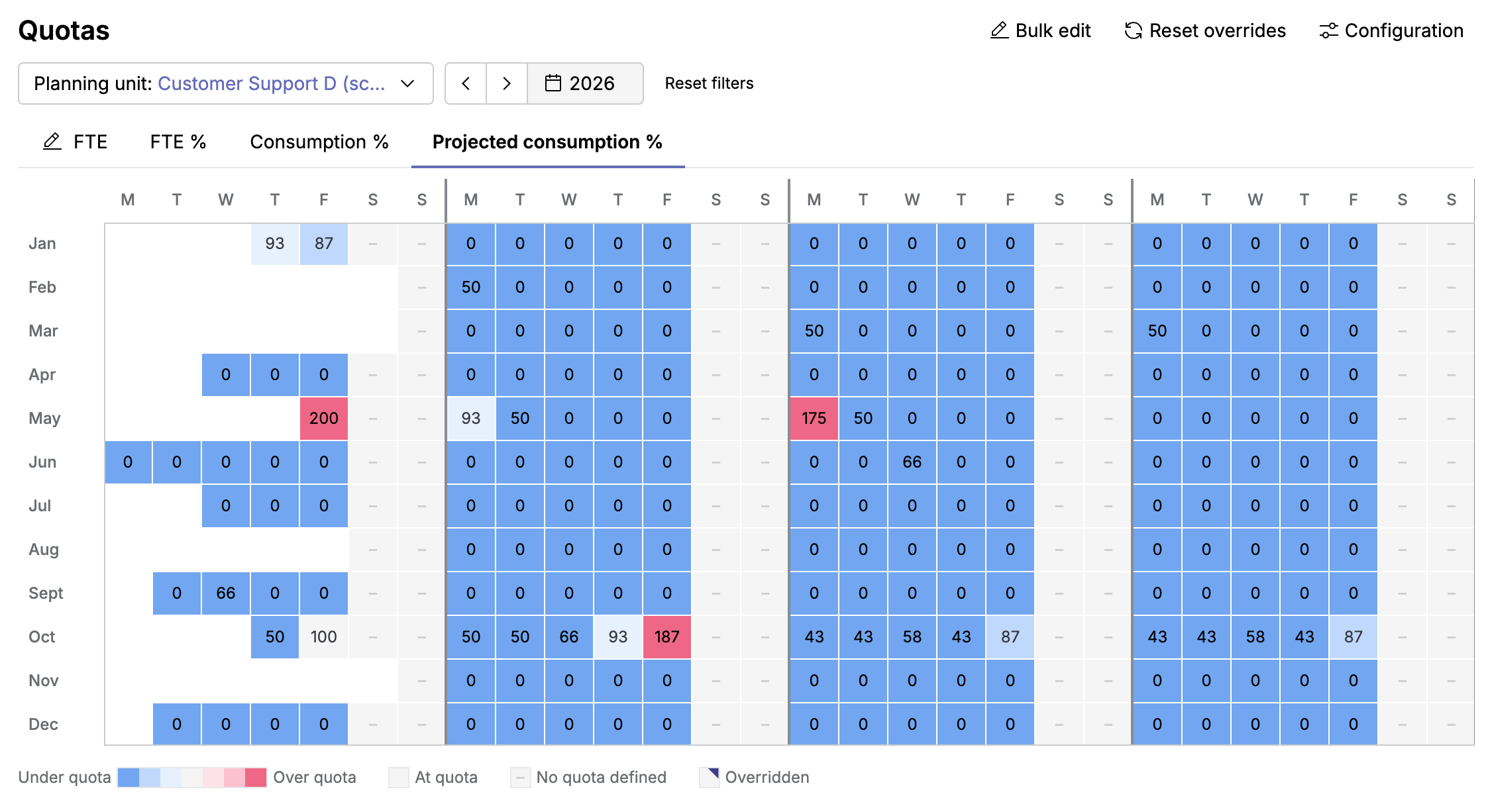
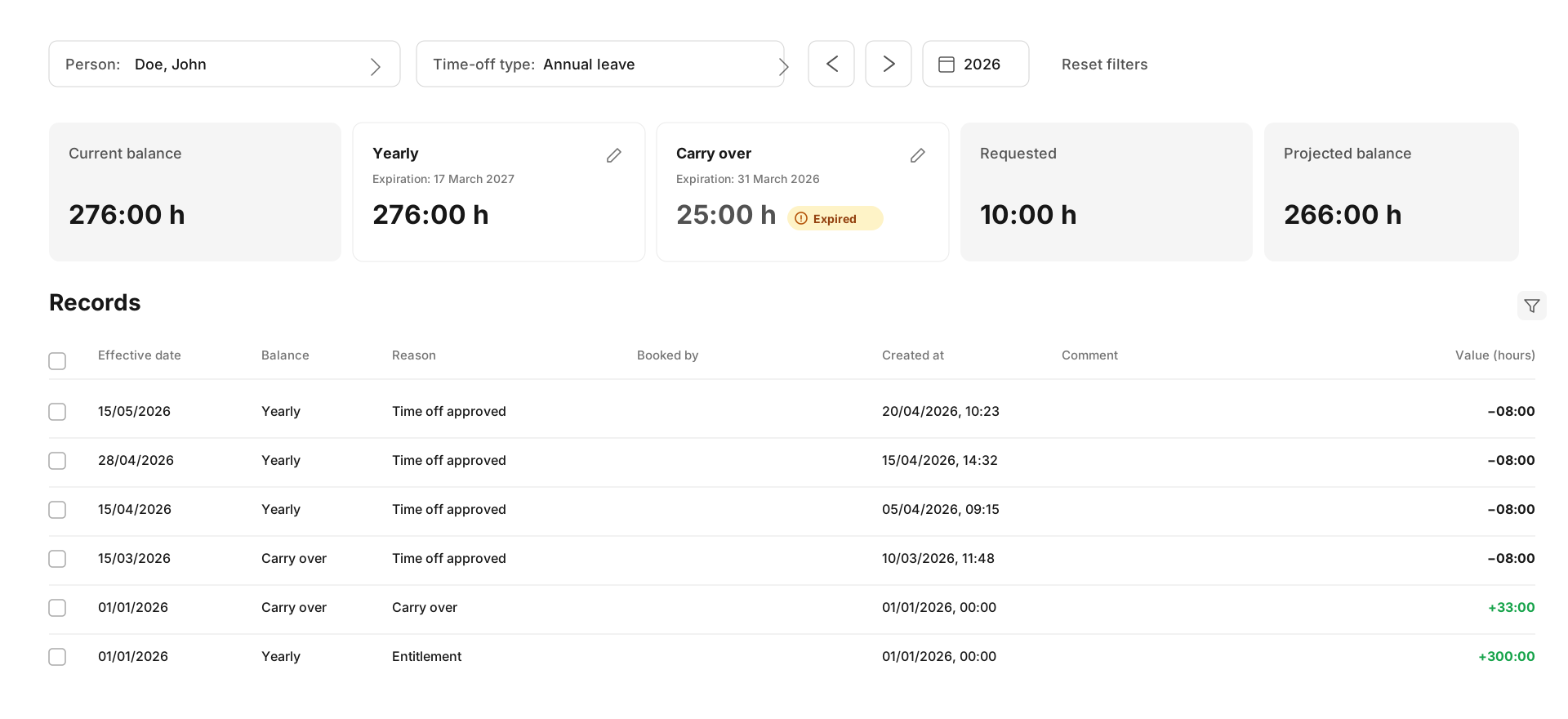
Clearer, easier-to-read balances. Balances will mirror the underlying time-account records directly, making them simpler to predict and explain. You'll see a clear breakdown of balance as of today, yearly balance, and carry-over balance (where applicable), with visibility into which records count toward each. Balances are calculated strictly within a single leave year. Adjustments are simpler — including for multiple people at once — and exports of balance data are improved.
time-off-balances

A more fine-grained permission model. Three new granular permissions — View Balances, Edit Balances, and View Accounts Summary — replace the broader Access to Time Accounts permission. Default Time Off permissions are also pre-configured for standard Supervisor roles, so new tenants can use Time Off without manual permission setup.

Public API access for balance data. Shortly after the main release, new public API endpoints will be available for listing balances, accessing balance records, and adjusting balances — making it easier to sync time-off information with external systems.

What to expect. This release includes a data migration. Your balance values per leave year will not change — adjustment records will be added where needed to ensure this. We'll be rolling out the change gradually.

Find details in our Help Center. For further information, reach out to your Customer Success Manager.


May 21, 2026

Redesigned Time Off Requests pages and CSV import for time off

Live

These updates are for customers using the new Time Off.

Deciding on time-off requests is now faster. The redesigned Request details page shows everything you need in one place — balance, team availability, overlapping absences — with quick navigation between requests. The overview adds sortable columns and additional filters so the right requests are easier to find. Find details in our Request details page article.

You can also create requested and approved time-off entries for many people at once by uploading a CSV file from the Requests view. Imports follow the same rules as manual entry, and email notifications go out only for approved entries. Find details in our Import time-off requests article.

May 08, 2026

Erlang-A-based requirement calculation

Live

Peopleware now supports requirement calculations based on the Erlang-A model. The new "Calls – Single Activity (Erlang-A)" calculation type is available in Forecasting > Requirement Calculations and lets planners factor caller abandonment into staffing requirements. Erlang-A is also available as a calculation method for Sub-Activities within the calculation for the Multi-Activities.

May 07, 2026

Self-serve deletion of imported integration data

You can now delete imported integration data on demand, directly from the integration configuration — for a specific data type, queue, and time range. Find details in our Help Center.

May 05, 2026

Configure the data aggregation interval for Genesys Cloud

Live

You can now adjust the aggregation interval of historical queue data imported by the Genesys Cloud integration — and since the forecast interval follows the historical data, this lets you tailor forecast granularity to your needs. Find details in our Help Center.

May 05, 2026

15-Minute Auto-Refresh for Dashboards with "External Systems" data

Live

Dashboards that include "External Systems" data now use a fixed 15-minute auto-refresh. Dashboards without "External Systems" data continue to support the full range of refresh values from 30 seconds to 15 minutes.

Apr 24, 2026

Native Amazon Connect integration

Live

The new native Amazon Connect integration provides direct access to historical volumes, average handling time (AHT), and both historical and real-time agent statuses, eliminating the need for a universal or custom setup. This reduces complexity, improves reliability and security, and makes onboarding and support faster. Find setup details in our Amazon Connect help center article.

Apr 20, 2026

ADP integration now assigns planning units automatically

Live

New users created via the ADP integration are now automatically assigned to a default planning unit, ensuring they are immediately visible to planners. This reduces manual setup effort and improves operational readiness. Learn more in the ADP help center article.

Apr 15, 2026

Enhanced Account Security & Active Session Management

Live

Monitor and control all active logins with the new Active Sessions functionality, and benefit from strengthened password and 2FA management to make your account more secure. These improvements give you full transparency and ensure only you can make sensitive account changes.

Mar 27, 2026

Scheduling Periods – refreshed design and improved usability

Live

Scheduling Periods now feature a refreshed design and improved usability, offering a clearer and more consistent experience. They can be found under Scheduling > Scheduling Periods, highlighting their role in managing the scheduling workflow. Access is now controlled via a dedicated permission for better management.

Mar 27, 2026

Email notifications for shift swap decisions

Live

Agents now receive email notifications whenever a shift swap request is approved, rejected, or becomes invalid before a decision. This makes the swap process clearer and more transparent, so agents can easily track the status of their requests. Each email also includes a link to Peopleware Me, allowing agents to quickly initiate a new swap if needed.

Mar 05, 2026

Simpler permission configuration to access Scheduling > Configuration

Live

The previous permission "Access to Plan Configuration" is now removed. To access the pages under Scheduling > Configuration, only the access to the respective entities is now needed, so the configuration is simplified and more straight-forward.

Feb 13, 2026

Modernized experience for Forecasts and Workloads

Live

You can now manage Forecasts and Workloads in a refreshed, more intuitive interface.

The Forecast landing page is now called Forecasts. This remains your familiar central hub for creating and adapting forecasts to meet your specific requirements and calculating staff requirements. Additionally, the Workloads section has been completely redesigned to streamline configuration and improve queue assignment.

Various improvements have been applied to make your forecasting more efficient, such as high-performance zoom functionality for charts, and a persistent AHT compact view.

Feb 12, 2026

New design and updated functionality for Reports

Live

Reports creation under Analyze now features a refreshed design to optimize your workflow. Additionally, created reports can once again be viewed immediately without going through Job status.

Feb 10, 2026

Updated “People” to fully replace “Employees”

Live

People has evolved to include all the features you know from the legacy Employees page. More information has been added to the table and details view to make People even easier to use. A new feature for quicker deletion was added to further aid convenient management of your users. Learn more.

Sunset

With the release of the new navigation next week, Employees (under WFM > Administration) will be removed. Permissions for accessing employee data will then be managed only through roles. Any custom, user-based permissions will be removed, and affected users will inherit permissions from their assigned role.

Feb 06, 2026

Time Accounts and Target Work Times with a refreshed design

Live

Time Accounts and Target Work Times (formerly Target Work Accounts) now feature a modernized, more consistent design for easier planning and management.

You can access both features under Scheduling > Configuration, where balances, targets, and adjustments can be tracked and managed with improved usability.

Feb 03, 2026

A new navigation to get work done faster

Starting the week of February 16, 2026, a new navigation will be available to all users, offering:

  • A modern look and feel
  • More intuitive and efficient workflows
  • Enhancements to improve your product experience

More details

Jan 23, 2026

New Locked Periods: Protect critical planning data

Live

Planners can now use Locked Periods to secure scheduling data for a specific plan level over a defined time range, ensuring it can no longer be altered. This makes it easy to preserve data integrity for critical exports or reporting.

Jan 21, 2026

Exclude specific activities from Create Optimized Schedule

Live

You can now mark certain activities so they are not written back to the schedule when using Create optimized schedule. As a planner, this you more flexibility — for example, when only selected portions of a shift should become visible in the final schedule, while the full shift is still considered during optimization. This feature is available as an add-on.

Jan 15, 2026

Easily distribute contact volumes

Live

With the new Distribution - Contacts (time frames), planners can distribute forecasted contact volumes across more than ten teams or service providers with full control over allocation. The distributions can be viewed in Dashboards and via API, making it quick and easy to verify all allocations.
This feature is available as an add-on.

2025

Nov 13, 2025

New Object Duplication Function for Scheduling Master Data

Live

You can now duplicate Day Models, Contracts, Week Time Patterns, and Work Time Pattern Models directly from their index or edit views.
This makes it significantly faster to create similar objects without having to rebuild them manually.

Nov 11, 2025

A new design for creating Reports

Live

Creating Reports now has a new modern design that’s simpler to use and easier to navigate. You’ll find it under Analyze > Reports, with the same functionality you’re used to. Learn more.

Note: The generated report will only be accessible via the Job status page, which is available to users with the respective permission.

Nov 10, 2025

More flexible Help Center access

Live

Roles can now be configured to view the Help Center only, or view the Help Center and create tickets. Non-support staff can now easily access self-service resources without ticket creation rights.

Nov 10, 2025

Requirement Scripts page retires beginning of December

Sunset

The old Requirement Scripts page will be removed on December 10, 2025.
The new staff Requirement Calculations page fully replaces it — faster, simpler, and easier to use.

Nov 06, 2025

Auto-accept shift swaps for faster exchanges

Live

Agents can now set preferred shifts or colleagues when offering a swap in Me. Matching offers are automatically accepted, making shift swaps significantly faster and more convenient for agents.

Oct 20, 2025

Requirement calculations are now faster and easier to use

Live

The new staff requirement calculations page brings together all available calculation methods in one place. It’s significantly faster and easier to use, and thanks to the new presets functionality, for most last-used or custom scripts, your settings have already been carried over. The new page will soon replace the old requirement scripts page.

Oct 09, 2025

Cisco Webex Contact Center integration now available

Live

An integration for Cisco Webex Contact Center is now available. This cloud-to-cloud solution imports call, chat, email, and social media history, along with agent status and real-time agent status (RTA).

Oct 09, 2025

Peopleware now connected to 8x8 Virtual Contact Center

Live

An integration between Peopleware and 8x8 Virtual Contact Center (VCC) is now available. This cloud-to-cloud solution supports multiple media types inbound and outbound (phone, chat, email, voicemail) and includes historical and real-time agent status (RTA).

Sep 24, 2025

Universal CSV Integration: Now with SFTP support and enhanced schema

Live

The universal CSV integration has been updated, introducing direct SFTP server support and a more flexible schema for plan-data imports. These improvements allow for seamless, automated imports of files up to 32 MB, enabling more flexible data handling.

Sep 20, 2025

A new design for Integrations

Live

The Integrations page now has a clean, modern look that makes it easier to manage your integrations. You can find it under Account > Integrations. All related Help Center articles are now updated to match the new design and keep everything consistent.

Sep 17, 2025

Forecasts now run up to 100× faster

Live

Forecasts now run up to 100× faster, with updates available within minutes after changes. This means you can make adjustments and respond to workload shifts far more quickly, while forecast accuracy remains unchanged.

Sep 12, 2025

Manage your background jobs faster

Live

Save time with powerful new search, filter, and bulk actions in Background Jobs. For better clarity, the Job Status page now shows a task's originating background job, improving traceability. Learn more.

Aug 28, 2025

A new design for WFM Settings

Live

The WFM settings page now has a modern design that’s simpler to use and easier to navigate. You’ll find it under Account>WFM Settings, with the same functionality you’re used to.

Aug 27, 2025

A fresh new look for Day Models

Live

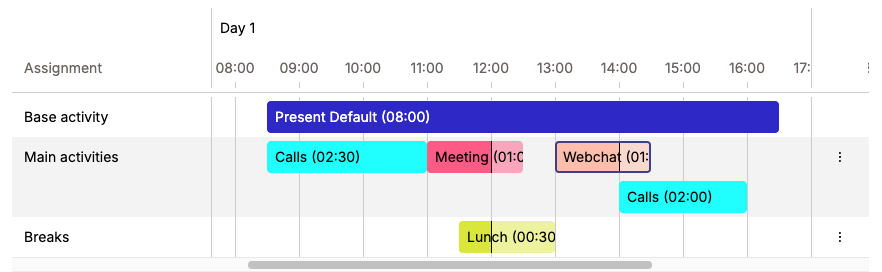
A new, clearer, and more intuitive view of Day Models is now available in Plan>Configuration.

This enhancement allows you to:

  • Get a clear overview of each activity in the day with the new Timeline.
  • Clearly see the base activity represented in the Timeline.
  • Edit the base activity from the Timeline. 

480912823-e1ece68c-5f92-492f-833e-8cf98394b059

To learn more, check out the Help Center.

Aug 26, 2025

Insert shift sequences into additional levels

Live

Previously, shift sequences could only be inserted into Schedule and Actual levels. Now you can insert them into Version 1, Version 2, and Version 3. This adds flexibility for building complex planning and reporting setups. Available in the Enterprise tier. Learn more.

Aug 13, 2025

“People” replaces “Employees” this September

Live

“People” now includes all the features you know from the old “Employees” module, with a modern and easier-to-use interface. Learn more.

Sunset

From September, “Employees” (under WFM > Administration) will be removed. Permissions for accessing employee data will then be managed only through roles. Any custom, user-based permissions will be removed, and affected users will inherit permissions from their assigned role.

Jul 08, 2025

Make bulk changes to people's data

Live

No more need to make individual changes to people's data. Now, with mass updates, you can save time by updating key configurations, such as roles, skills, contracts, shift sequences, and more, for multiple people at once. Learn more.

Jun 17, 2025

Actual activities now fully editable in Intraday

Live

You can now change the start time, end time, and activity type of agent statuses in Intraday or add and delete activities entirely. Neighboring entries adjust automatically. Both Intraday Adherence and Shift Center now use the actual activities as the source, ensuring unified data availability across the applications. Learn more.

Jun 13, 2025

Improved Freshchat Integration: More granular channel grouping

Live

Source queues imported via the Freshchat integration are now distinguished not only by 'group' but also by high-level channel type (e.g., WhatsApp, Phone, Instagram), using Freshchat's 'source' field information. This enables finer granularity for forecasting and improves historical data accuracy in alignment with Freshchat reports. The updated queue definition may require a one-time reconfiguration of workloads. Learn more.

Jun 10, 2025

Automate recurring jobs with the new JobManager & JobProcessor

Live

Managing recurring tasks in your WFM system just got simpler. The new features "Job Status" (formerly JobProcessor) and "Background Jobs" (formerly JobManager) are built to save you time and give you more control over what runs automatically in the background.

Here's what's new:

1. Background Jobs (formerly JobManager)

With Background Jobs, you can set up recurring jobs like reports or shift sequences once as templates, and let them run automatically.

  • Manage and edit templates directly under Account > Background Jobs
  • Cleaner interface and easier scheduling, no technical setup required
  • Typical use cases include: daily reporting, inserting shift sequences, triggering automated assignments

2. Job Status (formerly JobProcessor)

With Job Status you can view which tasks are running, completed, or failed - all in one place.

  • Cancel, re-run, or remove jobs with a click
  • Now accessible from the main navigation bar
  • Admins can view all jobs and permit others users to either view all jobs or their own only

Everyone who previously had access to these features can now enjoy the improved versions, automatically available and free of charge.

If you don’t see the feature but are interested, just contact your CSM for a quick demo.

Jun 10, 2025

New integration: ADP

Live

You can now connect your ADP system directly with Peopleware for seamless syncing of employees, schedules, and payroll data. Learn more.

Jun 06, 2025

More Accurate AHT Imports for Genesys

Live

You can now configure which handling time metric (tTalk or tHandle) is used for each channel in the Genesys Cloud integration. This gives you more control over forecasting and reporting for calls, emails, chats, and social media. Learn more.

Jun 05, 2025

New Integration: AFAS

Live

You can now directly sync your people data with AFAS, the market-leading HR system in the Netherlands.

Jun 03, 2025

Time Off Management via API

Live

You can now manage time off and time-off types via the API. This includes creating, editing, and deleting requests, as well as customizing time-off types and assigning them to specific planning units. Learn more.

May 27, 2025

Advanced filter management in People

Live

You can now create, update, and delete advanced filters using a dedicated “Advanced filters” page. Build flexible filters with multiple criteria, group conditions, and apply advanced logic like AND/OR combinations. Filter by planning units, skills, contracts, and more – with precise control over values, priorities, and exclusions. Learn more.

May 05, 2025

Flexible CSV schemas for quick data import

Live

All CSV imports now follow a single, consistent structure. You can define a schema once and then select it across the product to import forecasts, contact data, agent statuses and more.

Your existing CSV integrations will continue to use their current schemas, which you can now view and edit under Account > CSV Schemas.

Check out the Help Center article for details on configuring, editing, and using CSV schemas across Peopleware.

Apr 15, 2025

CSV Export in People

Live

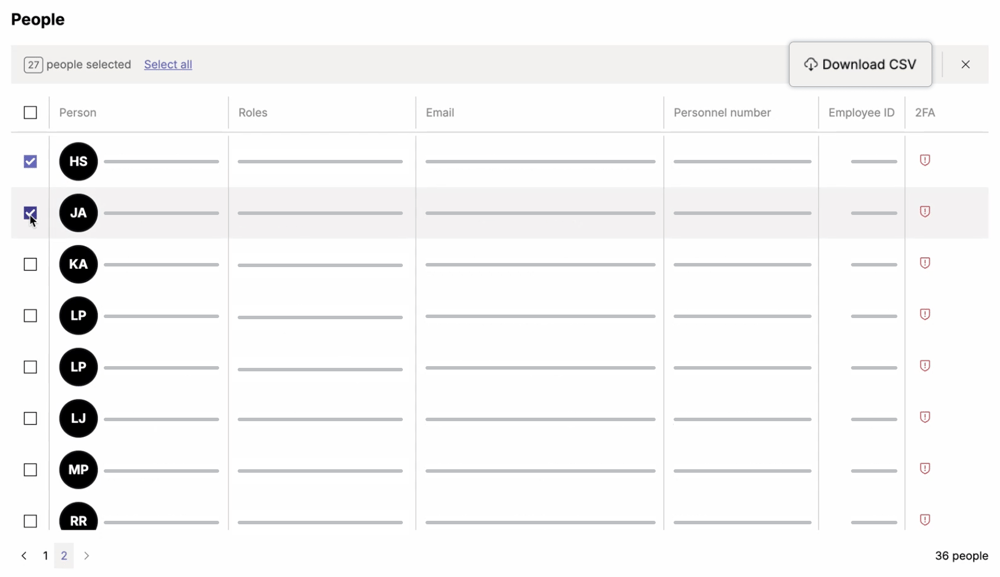
You can now export a filtered list of people to CSV - perfect for quick reporting or sharing with teams outside of Peopleware. Just select who you need and download your list in seconds.

Use the new selection mode to pick individuals, all people from the current page, or everyone across pages:

people-downloadcsv

You can narrow down your list further with the existing filters or search function before exporting. The CSV file includes first and last name, person ID, personnel number, email address, and employee ID.

Check it out directly under People!

Feb 24, 2025

Enhanced access rights role management

Live

When setting up access rights, it is now possible to duplicate existing roles. Newly duplicated roles will stay in edit mode so you can easily make the necessary changes.

Live

You can now select any role as the default role. The default role will be automatically assigned when creating a new person in People preventing access issues and eliminating the need for manual role assignment.

Feb 24, 2025

Enhanced color picker & new interface for planning units configuration

Live

The color picker has been extended with a new custom mode that allows you to select from an endless range of colors. You can now pick a color from the color palette or just define the HEX color code.

Live

User-defined parameters under Plan > Configuration > Planning Units is now available in a sleek new interface.

Feb 07, 2025

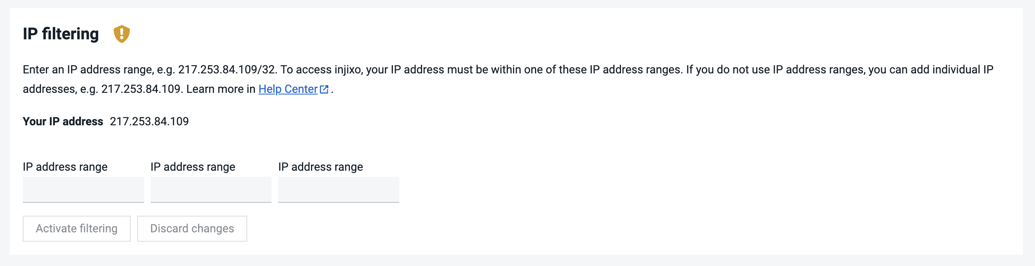
IP Filtering now supports unlimited address ranges

Live

You can now add as many IP address ranges as needed for login restrictions under Account > Security, removing the previous limit of three. This is available to admins and users with the "Configure Security Settings" permission if IP Filtering is enabled. Learn more.

Jan 25, 2025

injixo rebrands to Peopleware

Live

Starting today, all products and services from InVision Group - including injixo - unite under one new brand: Peopleware. Your WFM features are right where you expect them, with a fresh look and future improvements on the way. Learn more.

2024

Dec 18, 2024

injixo will move to a new domain

At the end of January, injixo will move to a new domain. Scheduled maintenance will occur on January 25. Admins may need to take a few steps beforehand to ensure a smooth transition. Please continue to use injixo as usual - you’ll be redirected once the domain is changed.

Depending on your setup, the change may require whitelisting the new domain (see instructions). ActiveX-reliant users will additionally need to add the new domain to Trusted Sites in Internet Explorer (see instructions). If you're the injixo admin, please ensure to check the mail from November and share it with your IT department as needed.

SSO users have been contacted to reconfigure their setup accordingly.

If you have any questions or need support, please contact your CSM or reach out to us.

Nov 19, 2024

Revamped features: Day Types, Attributes and Selections

Live

To make configuring scheduling components easier and faster, we've updated more WFM features with sleek, new interfaces! Now, you’ll find Day Types, Attributes, and Selections under Plan > Configuration - with a modern look for smoother navigation. You can still access these features under WFM > Administration > Scheduling but will be redirected to their new location.

Oct 31, 2024

Manage all employee data under People

Live

You can now configure and manage all your people's data using a more user-friendly interface under People. This was formerly only doable in AdminPro.

Oct 01, 2024

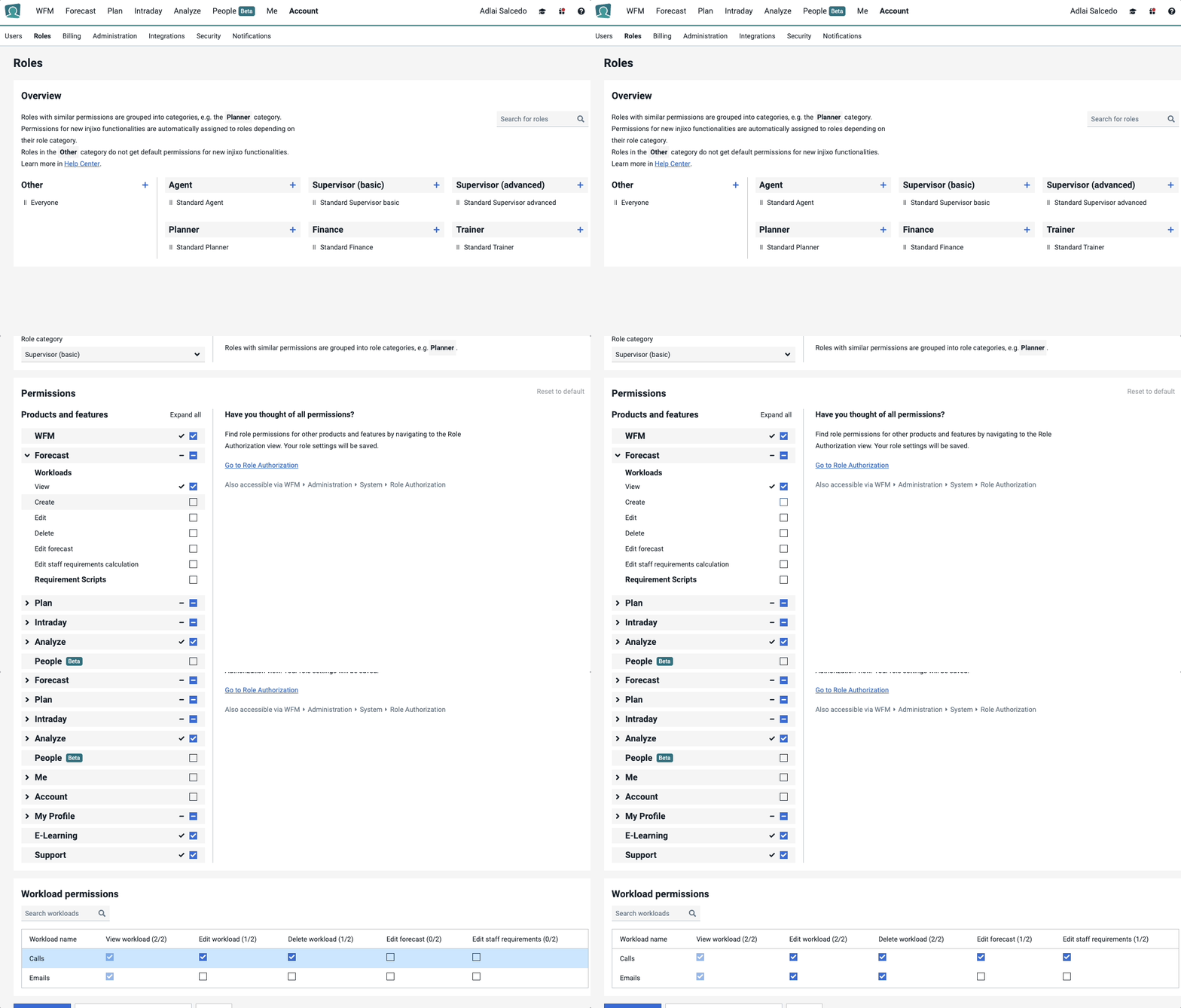
Manage dashboards permissions in more detail

Live

Choose from four permission levels—View, Create, Edit, and Delete— for either all dashboards or individual ones. This gives you greater control and flexibility, ensuring that users have the appropriate access while safeguarding sensitive data.

How admins can access this:

  1. Log in and click on Account in the top navigation bar, then select Roles. You will see a new, redesigned interface that helps you navigate and configure permissions more efficiently.

  2. Select any role from the left column. A panel will appear on the right, showing all permissions and their details.

  3. Scroll to the Analyze section to find the permissions for all dashboards.

Advanced customers can assign four permission levels—View, Create, Edit, and Delete—across all dashboards.

Enterprise customers have the added flexibility to set these permissions at both the overall and individual dashboard level.

If you are interested in this feature, please get in touch.

Sep 25, 2024

Assign events to multiple workloads at the same time

Live

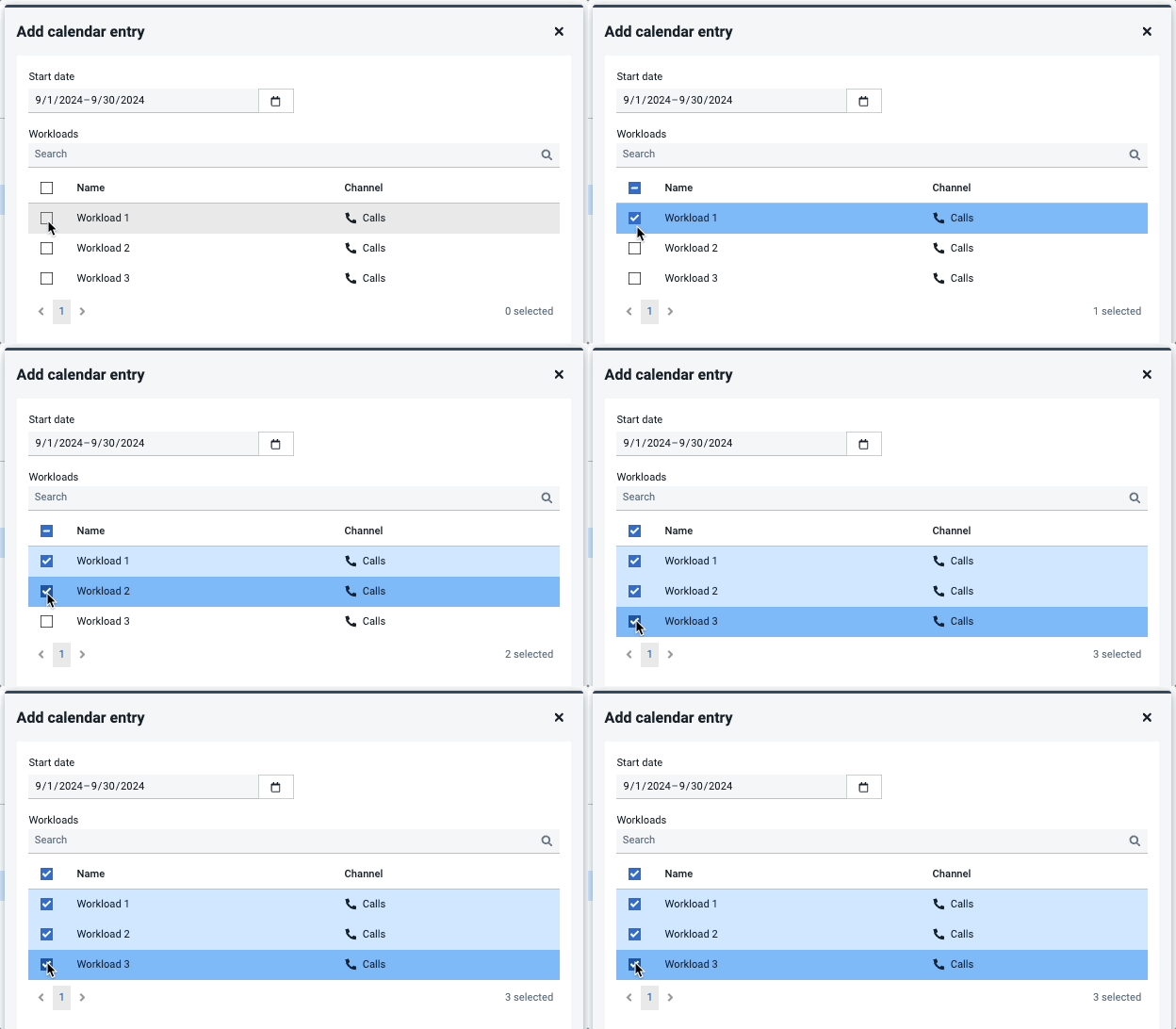
You can now assign a single event to multiple workloads in the same step. This provides a better overview of events, reduces the chance of errors when managing multiple workloads, and speeds up the process, allowing for more efficient workload management.

Event to multiple workloads

How to assign an event to multiple workloads:

  1. Log in and go to Forecast > Events in the top navigation.
  2. Select an event from the list. A right panel will appear showing the occurrences of the event.
  3. Click +Add, select a date range, and then check the boxes for the relevant workloads.
  4. Click Create to assign the event to all selected workloads.

Learn more about Events.

Sep 25, 2024

Create multi-day events in your forecast

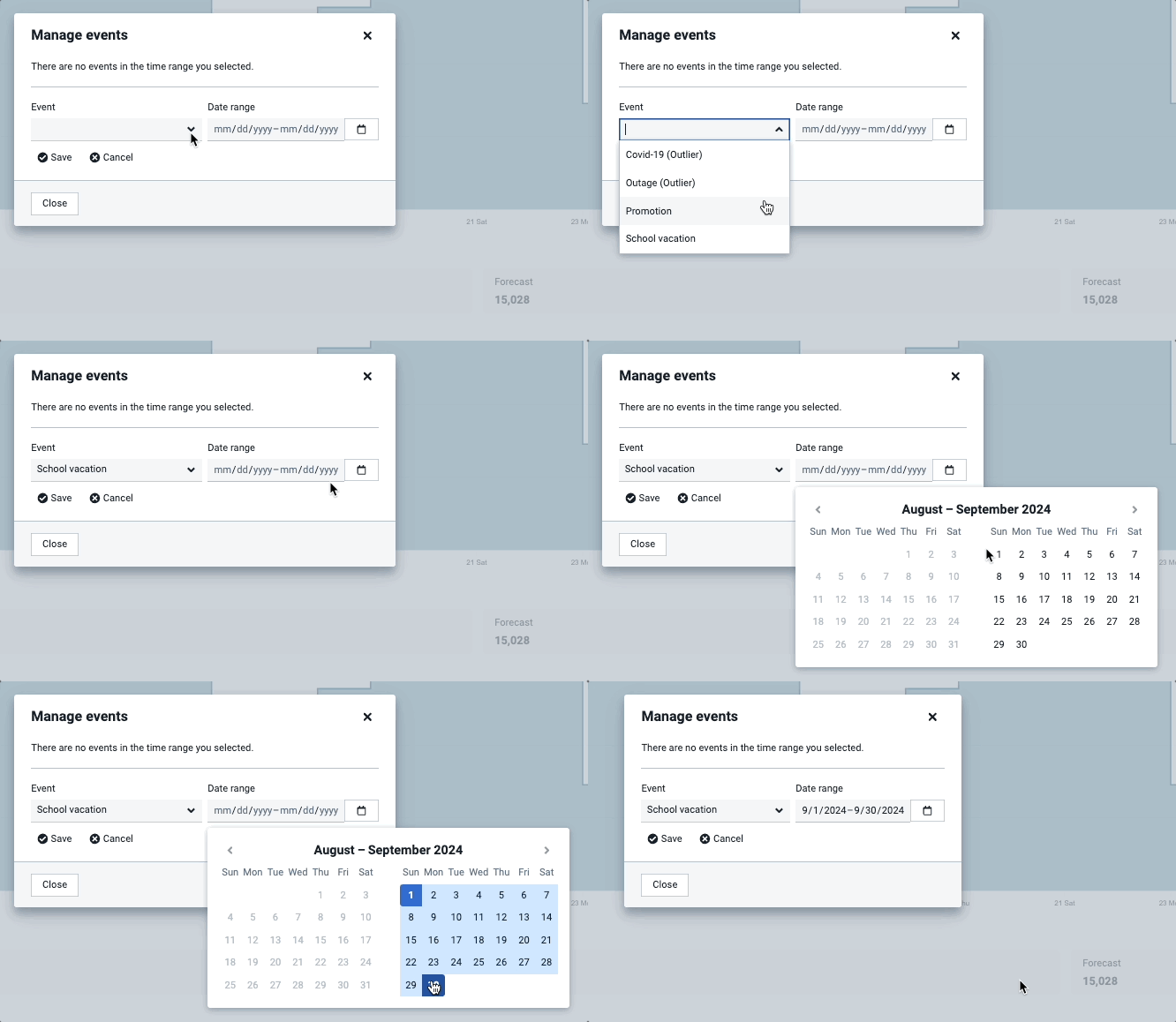
Live

You can now easily define and manage events spanning multiple days, such as school vacations or network outages, ensuring smoother planning and improved forecast accuracy.

Event periods

How to add an event period:

  1. Login and go to Forecast > Workloads and select a workload.

  2. Click on the three dots in the top-right corner and select Manage events.

  3. In the pop-up, click +Add event and choose an event.

  4. Select a date range and click Save—you have now applied the same event across multiple days.

Learn more about Events.
Aug 28, 2024

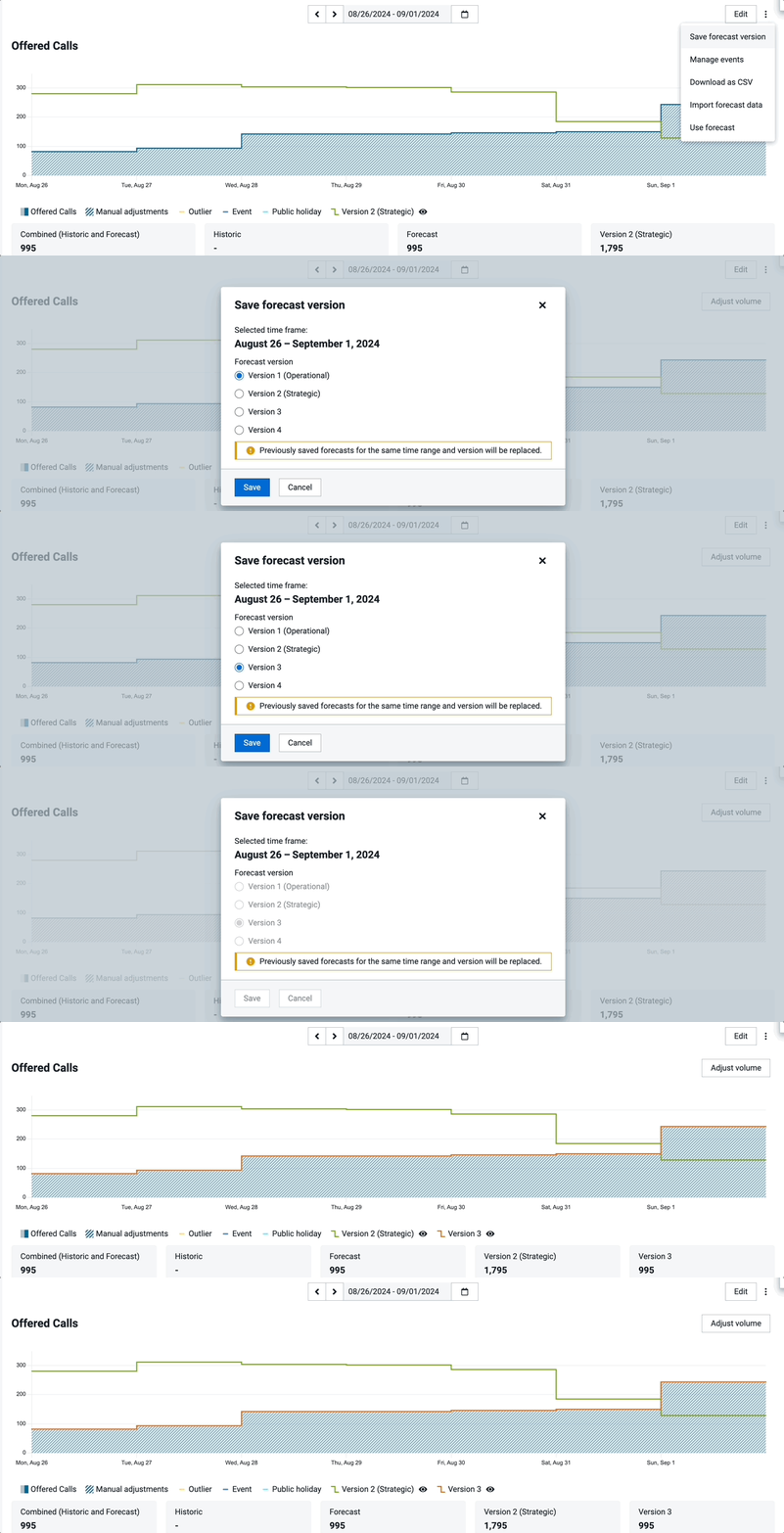
Two additional forecast versions

Live

You can now create, save, and export four forecast snapshots to easily track and compare different versions. This allows you to store forecasts with different horizons, better supporting your processes from capacity planning to short-term forecast updates.

New to versions? 

Learn how to create versions with just a few clicks directly on your Workload Detail page:

forecast versions workload detail page

or view them directly in your dashboards.

Aug 21, 2024

Easier maintenance of log files

Live

As an admin, you can now choose a custom folder for your logs (instead of using the default local folder) and set a maximum file size. This makes it easier to monitor and manage data according to your preferred organization method. Learn more.

Jul 01, 2024

Create forecasts up to 24 months in advance

Live

Forecasting capabilities have been extended from 12 months to 24 months for Advanced and Enterprise customers. This improvement allows you to anticipate future needs and trends more accurately, providing a significant advantage in strategic long-term planning. Learn more.

To create a 24-month forecast:

    1. Go to the Forecast module: Select a Workload.

    2. Set the date range: Use the date range selector at the top to choose the period you want to forecast, up to 24 months in advance.
Jun 19, 2024

Easier mapping of activities and people with external systems

Live

Easily manage the mapping of your people and activities with your external systems. Under the new People application, you can now manage each person’s external identifier under their profile. For activities mapping, head on to the Intraday application and manage activities under the new Configuration tab. Learn more.

  1. People mappings can be found under: People -> Choose a person from the list  -> Profile (scroll down to the bottom to see external identifiers mapping) 

  2. Activities mapping can be found under: Intraday -> Configuration
Jun 18, 2024

Unlimited Forecasting Events and new UI

Live

Within the Forecast application, you can now create and edit an unlimited amount of Events and name them as you wish. Learn more.

The previous limit of 63 events and 9 categories has been removed. Additionally, outages are now referred to as outliers—these are events that are ignored by the forecast. The process of assigning events remains the same, handled within the Workload UI. Enjoy the enhanced flexibility and simplicity! 

Jun 10, 2024

Create workloads without queues

Live

Forecasters and planners can now set up workloads without the prerequisite of an integration or source queues. Set up your workloads faster, upload your forecasts, and start your planning process immediately. Learn more.


If you are a customer in the onboarding phase, you can get started with forecasts right away even if your ACD integration has yet to be configured. 

And if you are providing business process outsourcing (BPO) services or working with multiple planning units, you can directly upload your forecasting data and get a workload running in no time. 

May 28, 2024

Unified user management in People

Live

The People app now fully incorporates all user management functionalities in one intuitive interface.

Sunset

The old user management page under Account will be deprecated and fully replaced by People on June 30.

This means for you:
    • All in one place: Manage all user settings and permissions quickly from one location.
    • Simplified experience: The new interface is designed for ease of use, helping you navigate user management tasks more efficiently.

Get started now: Transition to People by June 30, your new home for all things user management (and soon, all employee and planning-related data!).

May 23, 2024

ISO/IEC 27001:2013 certification

Live

We're are excited to announce that we have attained the ISO/IEC 27001:2013 certification, affirming our dedication to safeguarding your data and upholding top-tier security standards. Learn more.

What does this mean to you?

  1. Continuous security enhancements: Our partnership with MSECB, a top certification body, has enabled us to implement rigorous security measures. We're continuously enhancing our security practices to ensure that your sensitive information remains safe and secure.

  2. Ongoing commitment to your security: We remain dedicated to upholding the highest levels of information security and enhancing your trust in our services. As part of our commitment to transparency, we will continue to keep you updated on any further security enhancements or certifications.

May 13, 2024

Manage workload permissions in more detail

Live

You can now manage workload permissions in more detail. Choose between six permission levels - view, create, edit, delete, edit forecast, and edit staff requirement calculation. Permissions can be set for all workloads or individual workloads. This ensures that each user has the appropriate level of access based on their role, ensuring your data integrity and compliance. Learn more.

Here is how Admins can access this:

  1. Click Account > Roles
  2. Choose a role
  3. Manage permissions:
    • On the left, under “Forecast”, you can manage permissions for all workloads
    • At the bottom of the page, you can manage permissions for individual workloads

Workload permissions - english

Advanced customers can only set permissions to all workloads
Enterprise customers can set permissions to all workloads and individual workloads

If you are interested in this feature, please get in touch.

May 08, 2024

Enhanced network security: IP Filter

Live

You can now enhance your network security using IP filtering. By activating the network Access Control List (ACL), IP filtering ensures users can only access injixo from specific IP addresses. Users with other IP addresses will not be able to access injixo. Learn more.

IP filter

If your organization is interested in this feature, please get in touch.

Apr 12, 2024

SSO for multiple tenants

Live

Single Sign-On (SSO) now allows users to use a single identifier (UPN) to authenticate for multiple tenants. Each tenant requires separate login details, ensuring security while simplifying access for your team. Learn more.

Apr 02, 2024

RTA integration with Genesys CIC

Live

If you use the Genesys Interactive Intelligence CIC, you can now directly import interval-based real-time adherence (RTA) and contact data.

Mar 25, 2024

New permission for Requirements Scripts

Live

You can now define which user gets the functional permission to access the workloads and/or requirement scripts page.

Mar 05, 2024

Workloads details: Quick selection of full weeks

Live

In your Workloads details page, you can now select individual weeks faster by simply clicking on the calender week number.

Jan 30, 2024

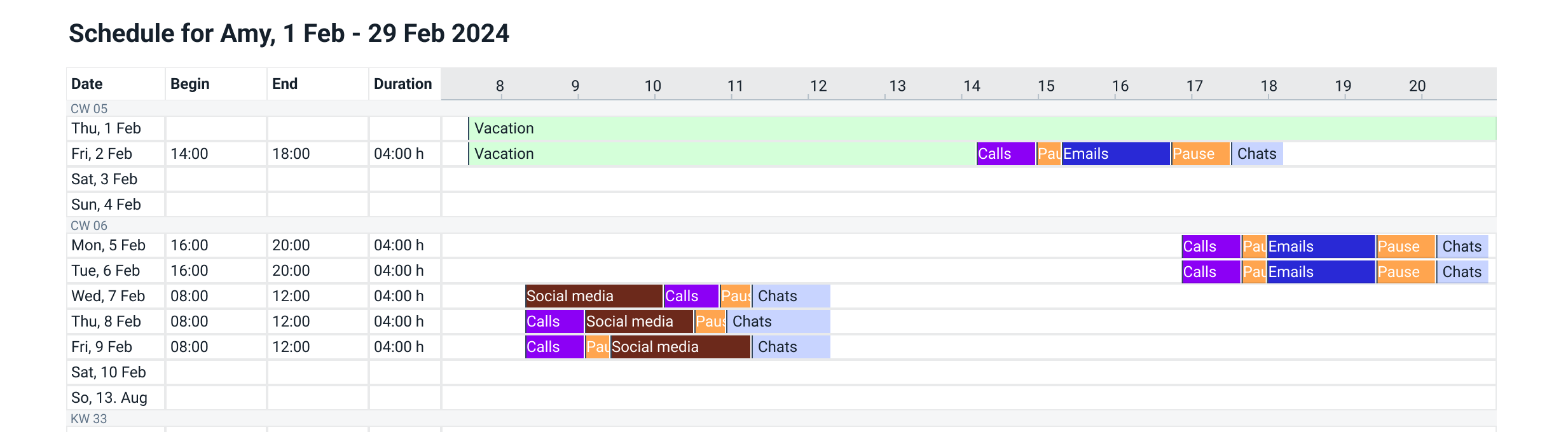
Download graphical schedule

Live

Your people can now download their personal schedules in the new 'Block View', featuring color-coded activities and a visual 30-day overview, all neatly organized on one page. Learn more.

Block View Schedule EN

Jan 25, 2024

Include service level data in your dashboards

Live

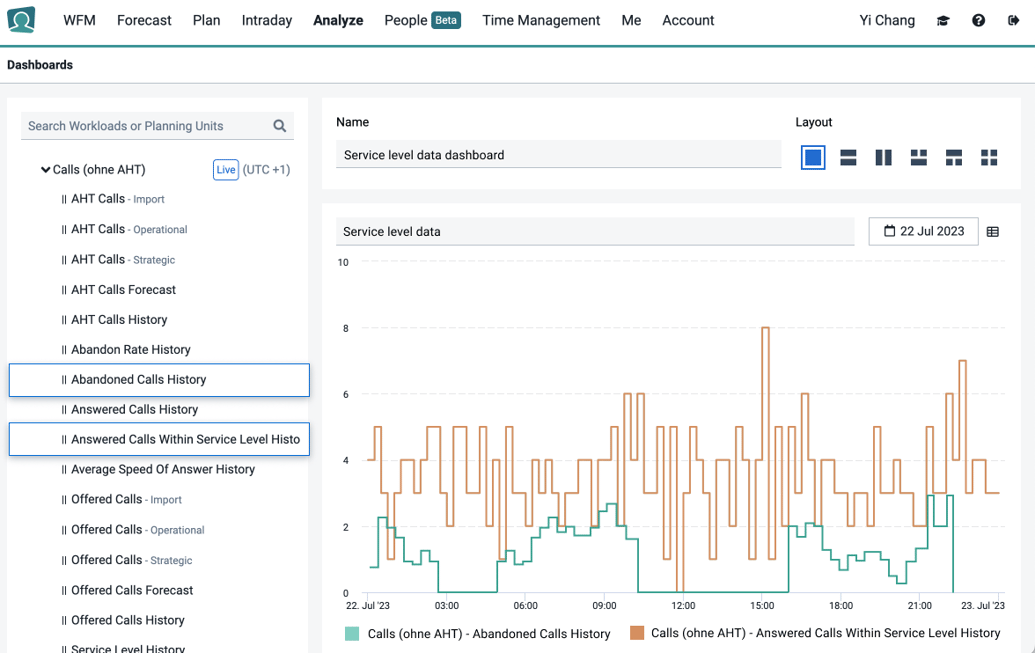
If you have a Genesys Cloud integration, you can now add to your dashboards the number of abandoned calls/emails/chats and number of answered calls/emails/chats within service levels. Learn more.

with highlight

When creating or editing a dashboard, you can find these values under workloads.

Jan 21, 2024

Improved Adherence report

Live

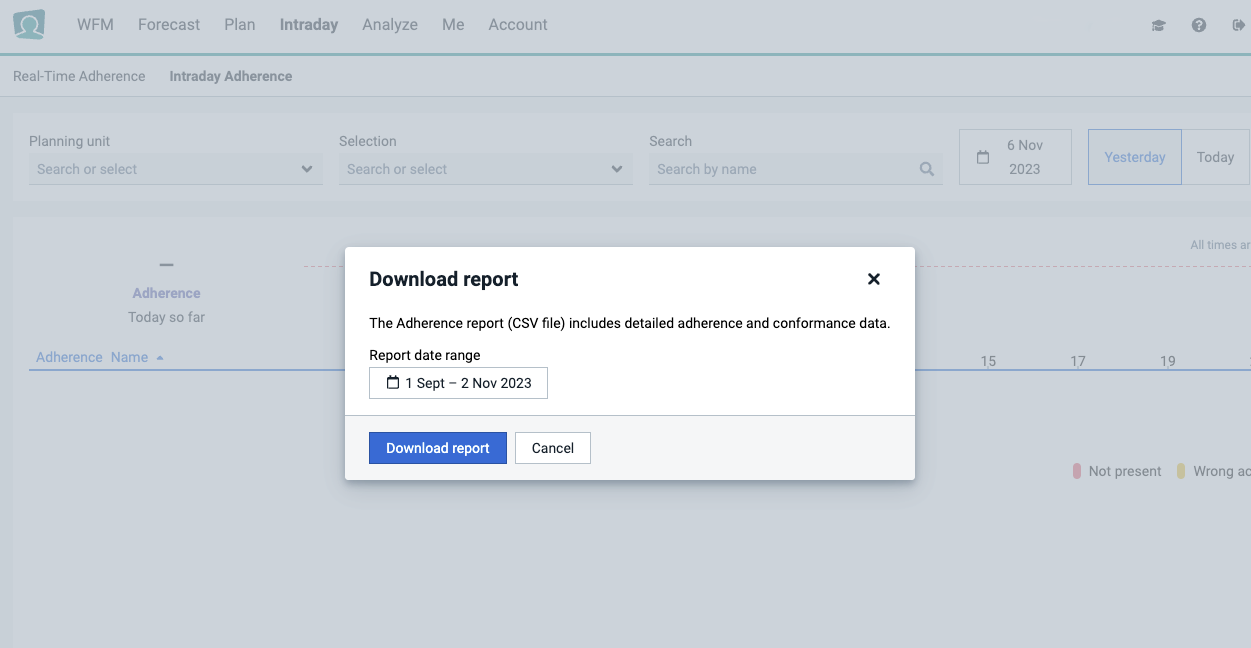
Within the Intraday app, you can now download Adherence reports as a CSV file for more convenient data analysis. Your CSV will contain individual hyperlinks for each agent, which will redirect you back to injixo’s Intraday module for more detailed agent information. Learn more.

adherence report2


Jan 10, 2024

🎓 New WFM course: Build shift foundations

Live

In the latest injixo Academy course, you can now learn how to set up:

Skills to match the right people to the right tasks

Activities your people work on

Day models for injixo Schedules to place shifts at the right time

Jan 08, 2024

🔗 Cisco/Odigo: Integrations for real-time adherence

Live

You can now import real-time agent statuses from your Cisco integration.

Live

You can now import real-time agent statuses from your Odigo integration.

Jan 07, 2024

Enhancements to your Forecast pages

Live

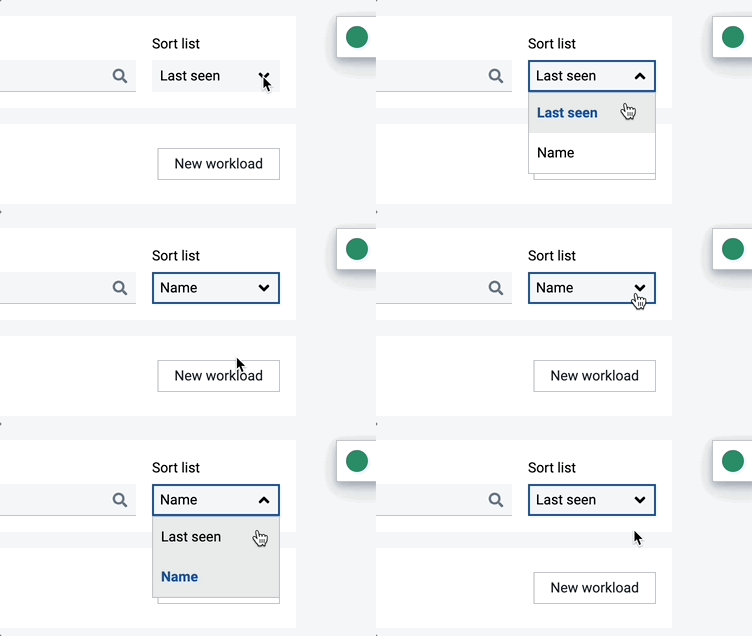
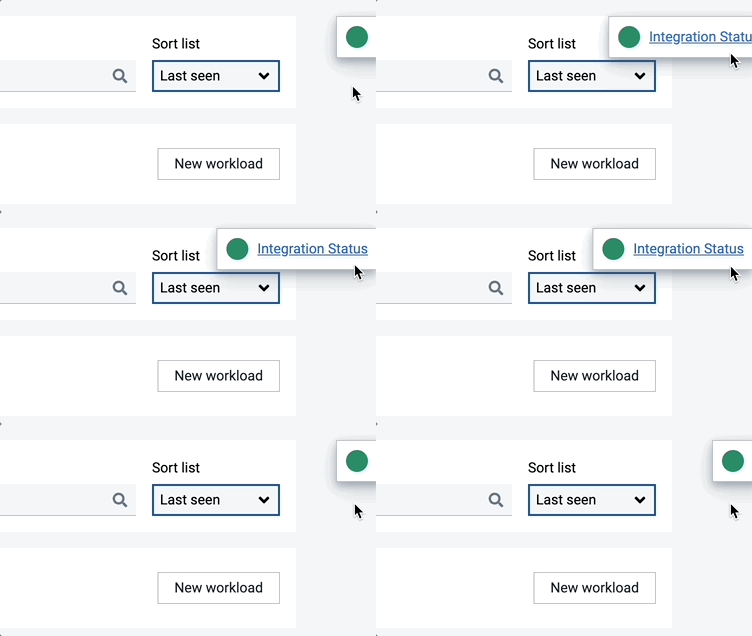
Your Forecast pages got a makeover! Spot these new tweaks in the top right corner of your workload management page.

  • Easier sorting: You can now sort your workloads by Last seen or Name with just a click.Aug - Sort

  • Clutter-free view: Check your integration status in this square.

Aug - Intergration

Happy forecasting!

Jan 01, 2024

Looking for previous updates?

While this changelog begins with this year's innovations, we're happy to share information on previous releases upon request. Just reach out to us! 😊